Audio Converter
This help file explains the Audio Converter window.
The Audio Converter supports converting audio files between common formats such as WAV, MP3, M4A, FLAC, and OGG.
The window contains two tabs:
- Single Conversion: Convert one file at a time
- Batch Conversion: Convert many files automatically
Open this window from the menu:
Utility → Audio Converter
Single Conversion
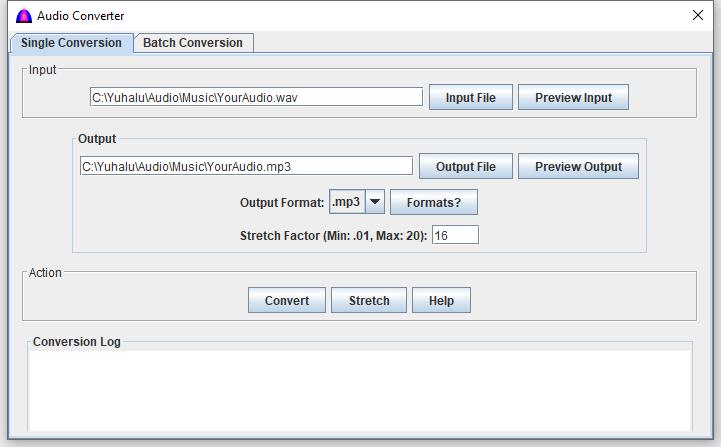
This tab converts one audio file at a time.
-
Click Input File button to show window to select a file to show on the field to the left of this button for conversion.
Click Preview Input button to play the selected audio.
-
Click Output File button to show a window to enter the output file to be saved.
Click Preview Output button to play the converted file if already converted.
-
Output Format
Select the desired output format:
.wav, .mp3, .m4a, .flac
Click Format? to view audio format details.
-
Stretch Factor
Controls playback speed and duration.
- Value < 1.0 → slower playback (longer duration)
- Value = 1.0 → no change
- Value > 1.0 → faster playback (shorter duration)
Valid range: 0.01 – 20
-
Action Buttons
- Convert – convert format only
- Stretch – convert and apply stretch factor
- Help – show this help file
-
Conversion Log
Displays progress and messages during conversion.
Batch Conversion
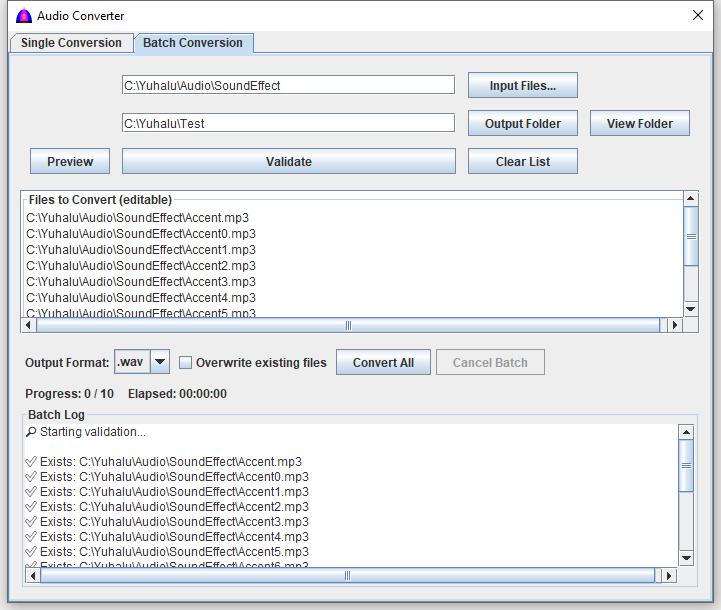
This tab converts multiple audio files automatically.
It is designed for processing large folders or many files at once.
-
Click Input Files... button to select one or more audio files to convert and to populate the Files To Convert (Editable) window, and note that the file path shows to the left of this button.
You can use Ctrl + A to select all files in a folder.
-
Click Output Folder button to select the destination folder for files to be saved.
Click View Folder button to view output contents if there are any in read-only mode.
-
Files To Convert (Editable) window
Displays the list of files selected for batch conversion.
You may add or remove file names before converting.
-
Batch Controls
- Preview Play the selected file.
- Validate Check files and parameters before converting.
- Clear List Remove all files from the list.
-
Output Options
Select output format:
.wav, .mp3, .m4a, .flac
Overwrite existing files – replaces files with the same name.
-
Batch Actions
- Convert All Start batch conversion.
- Cancel Batch Stop processing immediately.
-
Batch Log
Shows detailed progress and status messages.
Notes:
- Files are processed one at a time.
- If a file fails, the batch continues.
- Large batches may take significant time.
File name: AudioConverter.html
Date: 12/15/2025