Clipboard
This is the help file for the Clipboard feature.
The clipboard is a temporary buffer provided by the operating system for short-term storage and transfer of data within and between applications.
Each Copy (Ctrl + C) or Cut (Ctrl + X) operation replaces the current clipboard contents with the newly selected data.
Each Paste (Ctrl + V) operation inserts the clipboard contents into the document.
In Yuhalu, the Clipboard feature is provided to allow users to review, edit, or clear large clipboard contents in order to free RAM memory.
Note:
Each time Yuhalu starts, the software checks the size of the clipboard.
If the clipboard content exceeds a predefined threshold, this window opens automatically.
The clipboard contents may be edited or deleted as needed.
To access this feature manually, open the Edit menu and select Clipboard.
The clipboard window appears as shown below.
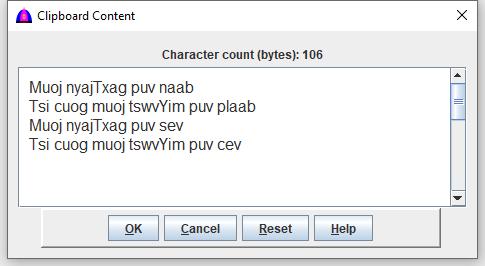
Available Actions
- OK — Keep the current (including edited) clipboard contents for subsequent use.
- Cancel — Discard changes and restore the original clipboard contents shown when the window opened.
- Reset — Clear all clipboard contents to immediately free RAM memory.
- Help — Display this help file.
File name: Clipboard.html
Date: 12/15/2025