Compare File
This is the help file for Compare File under Tool menu.
It is a feature to compare monosyllables, disyllables and polysyllables from two files to keep those words found only in either file, but not both.
To use this feature, click Tool, then Compare File from the drop down to show as below.
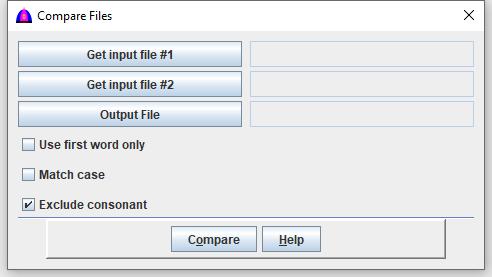
The following explain what each button or checkbox does:
Get input file #1: Select the first file from a popup window to fill the field on its right.
Get input file #2: Select the second file from a popup window to fill the field on its right.
Output File: Select output file, example: CompareFileWord.txt, to fill the field to its right.
Check any applicable checkboxes as option:
Use first word only: Keep only the first word from each line separated by space.
Match case: Match case when comparing words from each file.
Exclude consonant: Check to exclude consonants.
Compare: To process, then follow instructions when they show up.
Help: Show this help file.
File name: CompareFile.html
Date: 12/15/2025