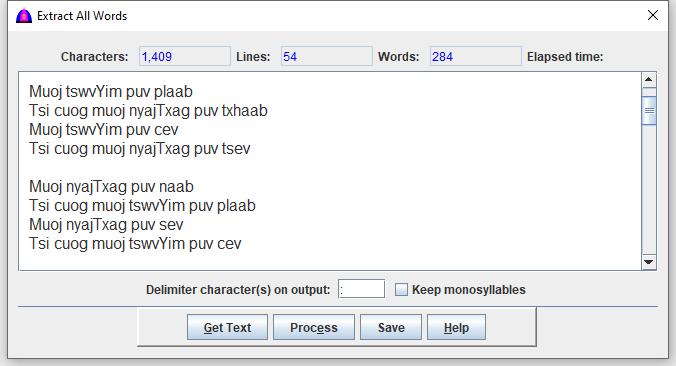
This is the help file for Extract All Words option under Tool menu.
It is a feature used to extract Hmong RPA words from the selected texts on the main document, and to sort words in ascending order to remove duplicated ones.
It is different from the Extract Key Words because this one extract all words in the document separated by white space instead of just the beginning of words separated by delimiter.
To use this feature, click Tool when available on the menu bar, then Extract All Words from the drop down to show as below.
Procedure
This process does not affect the texts showing on the main document.
Texts can be selected with the keyboard or with the mouse. To select all the texts in the document, do a Ctrl+A.
Enter new character(s) to the right of the field Delimiter character(s) on output: or use the default colon (:).
Check the Keep monosyllables checkbox to keep them; otherwise, they are thrown out when extracting.
Select the texts with the keyboard or the mouse from the main document.
Click the Get Text button to get the selected texts to fill this window.
Click the Process button to extract.
Notes after extracting:
If there are errors, a window will show them.
There will be windows showing one after another with list of words if there are English and/or Danashan texts in the document.
The window is replaced with the extracted data that are sorted in ascending order.
Click the Save button to enter file to save texts showing on this window if needed.