This is the help file for Extract Key Words option under Tool menu.
It is a feature to extract words separated by input character(s) found for the first occurrence one each line. It can be used for any languages because it parses the key word(s) based on the delimiter character(s) and blank space. This means that it does not check if a word is Hmong RPA or not.
This feature is useful to extract words to compile lists with words to create dictionary, spelling check, and other uses.
Besides these, user can use it to convert from monosyllabic words to disyllabic and polysyllabic words by removing the spaces on the fly instead of editing manually.
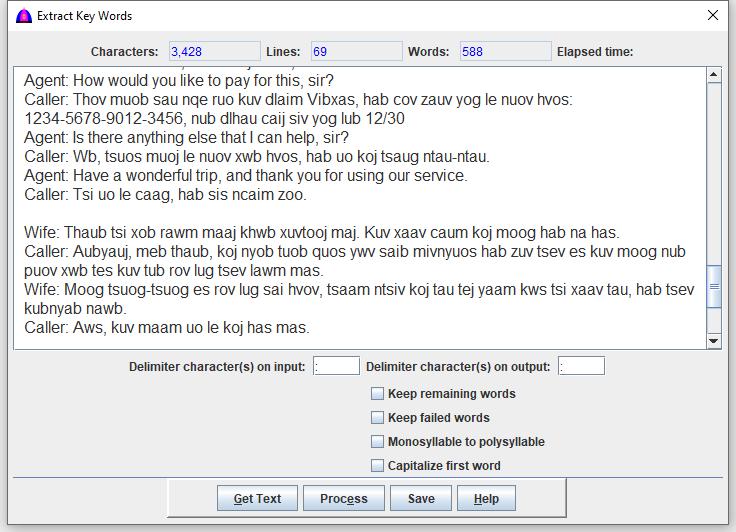
To use this feature, click Tool when available on the menu bar, then Extract Key Words from the drop down to show as below.
Procedure
This process does not affect the texts on the main document.
Texts can be selected with the keyboard or with the mouse. To select all the texts in the document, do a Ctrl + A.
Enter new character(s) to the right of the field Delimiter character(s) on input: or use the default colon (:). These are used to parse to key words.
Enter new character(s) to the right of the field Delimiter character(s) on output: or use the default colon (:).
Check the Keep remaining words checkbox to keep all remaining words after the delimiter character(s) on input.
Check the Keep failed words checkbox to keep all failed words or lines with no delimiter.
Check the Monosyllable to polysyllable checkbox to form polysyllabic words from monosyllabic ones. This means that each blank space between each syllable or word is removed, example: Peev xwm becomes Peevxwm.
Check the Capitalize first word to capitalize the first letter of the first word before the delimiter.
Select the texts with the keyboard or the mouse from the main document.
Click the Get Text button to get the selected texts to fill this window.
Click the Process button to extract, and note that this window is replaced with the extracted texts.
Click the Save button to enter file to save texts showing on this window if needed.