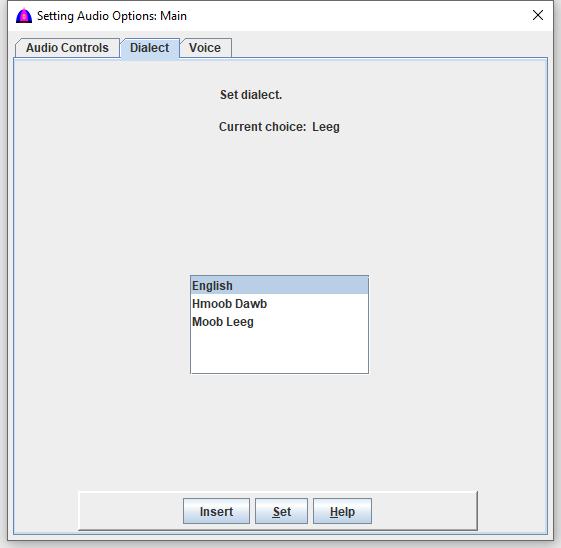
This is the help file to set dialect on the Dialect tab on the Setting Reading Options window under menu bar.
For RPA, one reason to set dialect is to read numbers, talking menus and other words defined in dictionaries in either white Hmong or blue Hmong dialect.
Setting dialect while reading does not affect the dialect because the selected texts had been already processed. The new setting will be used for subsequent text selection for reading.
This setting does not translate written words from one dialect to the other.
It does not matter to set to Hmoob Dawb or Moob Leeg dialect if there is no number in the text, but it is important to set English to read the texts correctly.
This is a global setting for the entire document, but in case there are inline commands such as <Dialect:Dawb>, <Dialect:Leeg>, and <Dialect:English> for mixed texts, these will override this global setting.
To use any of these commands with the document, type a command on a new line.
Examples
Number 7 will be read as xya if setting for Hmoob Dawb, and xyaa for Moob Leeg.
Number 20 will be read as nees nkaum for Hmoob Dawb, and neeg nkawm for Moob Leeg.
Each talking menu will talk according to setting dialect in either blue Hmong or white Hmong when the Talking menu checkbox is checked.
All words defined in dictionaries will be read as setting if some of the words are different for each dialect.
Refe to its window below.
Dialect description
Make sure to set to the correct dialect; otherwise, texts will be read wrong.
Hmoob Dawb: Set dialect for white Hmong.
Moob Leeg: Set dialect for blue Hmong.
English: Set dialect for English.
Procedure
Click the Dialect tab to show its window.
Instead of clicking a dialect, then click the button to set, just double click the dialect to set and to show to the right side of the label Current choice:.