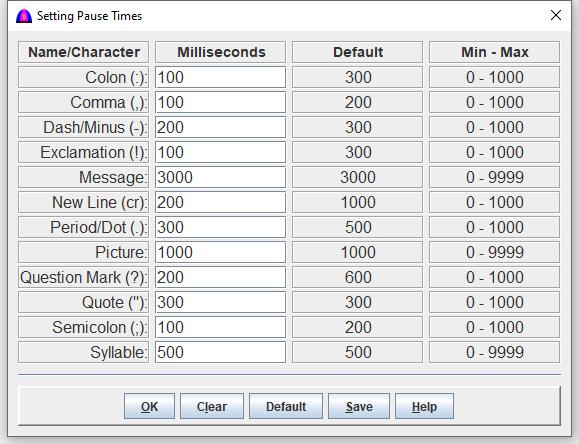
| Character | Name | Time (Millisecond) | Description |
|---|---|---|---|
| : | Colon | 300 | Pause as indicated before reading next syllable. |
| , | Comma | 300 | Pause as indicated before reading next syllable. |
| - | Dash/Minus Sign | 300 | Pause as indicated for number with dash such phone nuber. |
| ! | Exclamation | 300 | Pause as indicated before reading next syllable. |
| Message | 9999 | Pause as indicated for popup message. To pause without closing the window automatically, set it to zero (0) to allow the user to click to close it. | |
| cr | New Line | 350 | Pause as indicated for carriage return before reading next syllable. |
| . | Period/Dot | 500 | Pause as indicated before reading next syllable. |
| Picture | 1000 | Pause time before showing and reading next picture. | |
| ? | Question Mark | 800 | Pause as indicated before reading next syllable. |
| " | Quote |
300 | Pause for single or double quote before reading next syllable. |
| ; | Semicolon | 300 | Pause as indicated before reading next syllable. |
| Syllable | 0 | Add pause time after reading a syllable before reading the next syllable. It is to slow down the reading. For normal reading, use zero (0). |
| Name | Action |
|---|---|
| Keep and use number entered for each symbol or name on current session. All numbers are adjusted automatically within ranges. | |
| Clear all values to blank meaning zero (0). Note: When everything is blank, it means that there is no punctuation pause at all. In analogy, it is the same as reading some writings without a single punctuation mark. | |
| Set parameters from default column, and these are hard coded in the software due to getting better reading speed by experiments. | |
| Save all parameters to file PauseTime.cfg in Yuhalu folder for subsequent use until change again. All numbers are adjusted automatically within ranges. | |
| Show this help if needed. |