Set Picture Options
This is the help file for Set Picture Options under Setting menu.
To use this feature, choose Setting, then Picture Options from the drop down to show as below.
Most of these options are checkboxes used to show both the main and floating picture.
While reading aloud in progress, any one of them can be checked or unchecked as needed.
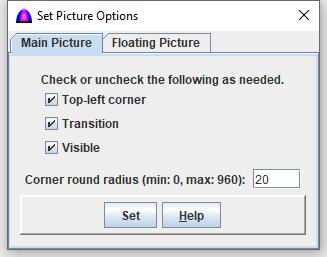
Main Picture
This is one that shows on the left side of the main document.
Top-left corner - To show as implied.
Transition - To show transition and animatiopn.
Visible - To make it visible.
Enter a number within the range to Corner round radius (min: 0, max: 960): 20
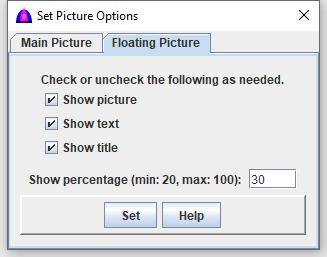
Floating Picture
This is the picture that shows while reading buttons on tabs and and cells on table.
Show picture - To show while reading or clicking.
Show text - To show the reading text.
Show title - To show title for file name of the picture.
Enter a number within the range to Show percentage (min: 20, max: 100): 30
Set - To use these options.
Help - To show help.
File name: SettingPictureOption.html
Date: 12/16/2025