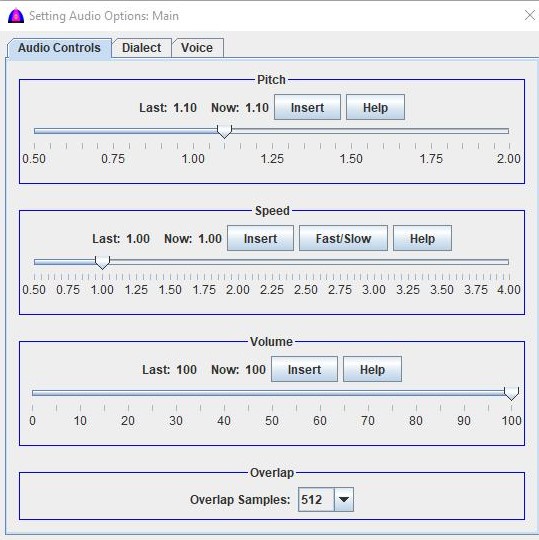
This is the help file to set pitch on the Speed, Pitch & Volume tab on the Setting Audio Options window under menu bar.
This setup can be done at anytime, and in case it is done while reading, it takes effect immediately until reaching an inline command or the end of the document.
This pitch will be overridden by the inline command <Pitch:1.25> inserted to the document.
To read a document as dialog for many people, use different pitch for each line or paragraph. Doing so, the reading will sound like many people talk to each other because of the different tones.
To include a pitch to the document by entering manually, just type this inline command as <Pitch:1.25> with no space because the software parses the selected texts by using space as word boundary or separator. Make sure there is a leading space and one trailing one for this command; otherwise, it will be spelled out character by character when reading.
Below is an example of three people who talk to each other:
<Pitch:1.25>: Koj yuov moog hov twg?
<Pitch:1.00>: Kuv yuov moog tom khw.
<Pitch:1.75>: Kuv nrug koj moog hab puos tau?
<Pitch:1.25>: Yog koj txiv kaam nuo, ib nrug nwg moog.
<Pitch:1.00>: Kuv kaam kawg mas yog meb xaav mooog naj.
Procedure
To sound normal, set it to 1.0. To sound higher set higher than 1.0, and to sound lower, set lower than 1.0.
This new setting is saved for subsequent uses until setting again.
To set pitch, click on the knob on the slider and drag it to where wanted, then release the mouse button. After releasing the mouse button, the new value should be displayed to the right side of the label Now: 1.25 as example.
Repeat from step above by choosing a different speed as needed.