Setting Fast/Slow Speed
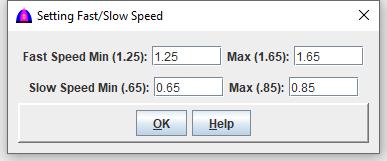
This help file explains how to set the fast and slow speed ranges used when reading RPA text aloud, including when exporting text to audio.
These settings apply to the entire document unless overridden by inline commands.
The fast speed range is used for words without ending punctuation, while the slow speed range is used for words with ending punctuation.
A random value within each range is selected for every syllable or word. This value is multiplied by the normal reading speed to produce small variations that reduce robotic sound.
Example: If the normal speed is 0.90 and the fast-speed multiplier is 1.40, then the resulting speed is: 0.90 × 1.40 = 1.26
This resulting speed is used for that particular syllable or word.
You may adjust these settings at any time. If updated during reading, the new values take effect immediately, except when generating long audio files.
Procedure
- Enter the speed within the range on this screen; or
- You may include these parameters directly in the document using inline commands.
Examples of inline commands:
- Fast speed: <SpeedFast:1.25-1.45>
- Slow speed: <SpeedSlow:0.75-0.85>
- Or insert them from Insert → Inline Command → All Commands, then modify as needed.
Note: Do not include spaces inside the inline command.
The software parses text using spaces as word boundaries.
Ensure there is one leading and one trailing space around the inline command; otherwise, it may be pronounced character by character when reading.
File name: SettingSpeed.html
Date: 12/17/2025