Setting Voice
This is the help file to set voice on the Voice tab on the Setting Audio Options window.
This software is written for Hmong RPA script, and it uses the syllable concatenation method. This means that each syllable needs a sound file.
Each sound file is recorded in WAV audio format with 44,100 hertz and in monaural.
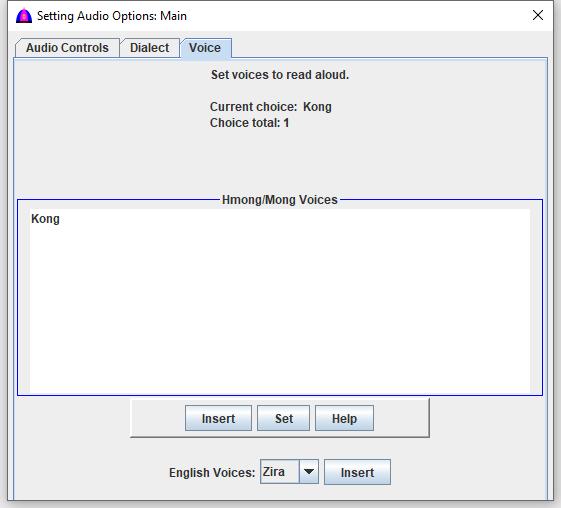
This voice setting is applied to reading texts, text to audio, and all audios, including talking menus unless there are inserted voices to the document.
This is how to select different voices to read if available.
IMPORTANT: Due to different frequencies for the same file name in different voice folders, please do not copy files from one folder to the other or vice versa; otherwise, readings will be out of tune, or they will sound as different person.
Folder Name Convention
In case the user wants his/her own voice with audio files to read, he/she can create a subfolder to store them under Voice\YourVoice folder, but not any deeper because the software does look beyond.
Notes:
- If setting while reading, this new voice takes over the previous one immediately.
- In order to show for selection, there should be at least certain audio files in WAV format in each folder under Voice\YourVoice. This number is just to allow the user to check his/her voices; otherwise, there will be a lot of errors for missing files while trying to process reading words.
- The subfolder under Voice\YourVoice contains all the audio files of a person.
- This person's voice will be overridden by those that are inserted into the document by the inline command <Voice:Mike> assuming that this folder has audio files to read.
Procedure
- Scroll up or down to show more choices if there are many.
- Click a choice to select.
- Double click a choice or click the Set button to set it, and to update the old voice with this new one for all selected texts. This means that if setting new voice while reading is in progress, the new voice takes over the old one immediately just like a new person takes over the reading.
File name: SettingVoice.html
Date: 12/17/2025